
Your write-offs are in a shoebox. AL found them.
A workbook built for your profession, sorted by Schedule C line. Excel and Google Sheets, emailed within minutes. One payment per tax year.

What kind of work do you do?
Each tracker uses the categories your profession spends on, mapped to Schedule C.
Insurance Agent
AHIP, E&O, CE credits, licenses and appointment mileage
Real Estate Agent
MLS dues, staging and photos, closing gifts and showing mileage
Real Estate AgentPRO
Everything above, plus profit and loss for every transaction
Truck Driver
DOT per diem meals, IFTA and IRP, factoring fees and load boards
Construction
Tools, safety gear, licenses, bonds, materials and job-site miles
Rideshare & Delivery
Mileage, platform fees, phone and data, tolls and supplies
Barber & Stylist
Booth rent, tools and backbar, with tips and retail sales on their own lines
Barber & SalonPRO
For shop and suite owners: chair rent collected, retail inventory and sales tax
Not on the list? Self-Employed Professional
For consultants, coaches, freelancers and any 1099 work not named above
A real workbook, built for your profession
- A Dashboard that totals your deductions as you log them
- Expense, income and mileage logs with your categories built in
- A Schedule C summary and quarterly estimates to hand your tax professional
More than a log. A full workbook.

Dashboard
Your deductions and estimated tax savings, totaled as you log.
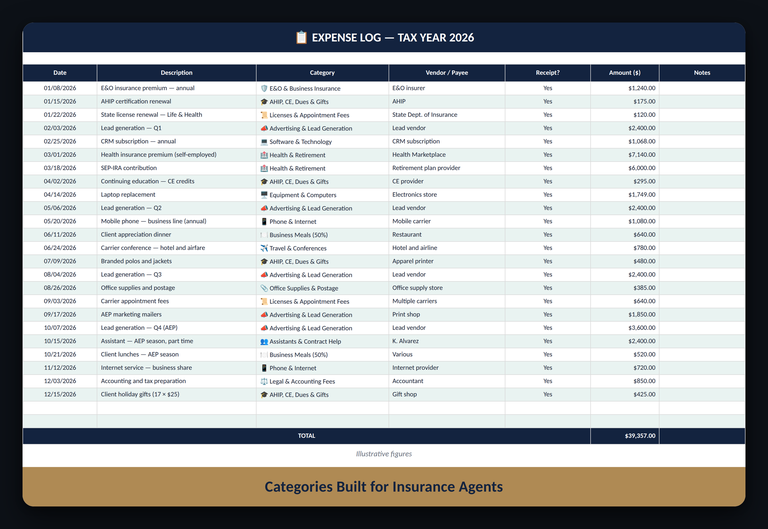
Expense Log
Pick a category built for your profession and it files itself.
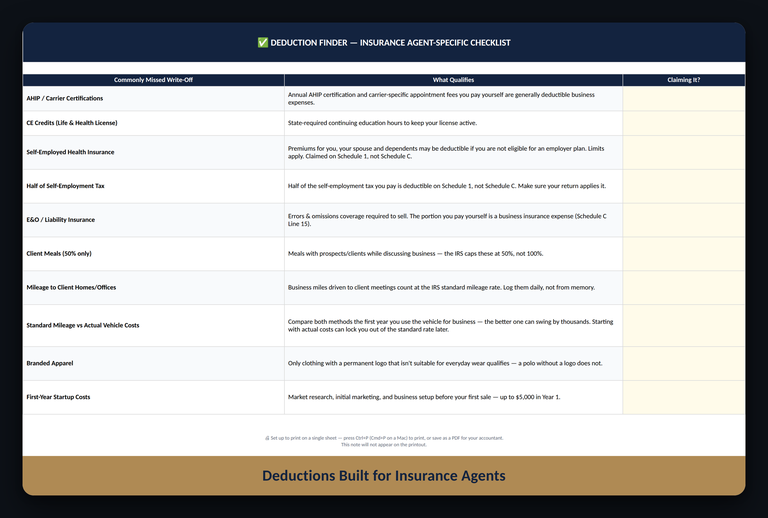
Deduction Finder
The write-offs your profession tends to overlook.
Screens show sample data. The full workbook is yours at checkout.
Built for people who like to see their own numbers
A good fit if you want
- One payment, with nothing that renews
- Your records in your own file, with no bank linking
- Categories made for your profession
- A clean summary to hand your tax professional
Good to know
- You enter your own income, expenses and miles. Nothing is imported automatically.
- Want automatic GPS mileage? Use a mileage app alongside it and log the totals here.
- AgentLedger organizes your records. It does not prepare or file your return.
Organized in three steps
Pick your tracker
Choose your profession and a color theme.
Pay once
One payment for the tax year. Nothing renews.
Get your files
Excel and Google Sheets editions arrive by email within minutes, with a free Personal tracker.
Before you buy
Do I need Microsoft Excel?
No. Every order includes an Excel edition and a Google Sheets edition. Google Sheets is free with a Google account.
Does anything renew or charge me again?
No. You pay once for the tax year. There is no subscription and no bank linking.
What does “per tax year” mean?
Each workbook covers one tax year, because mileage rates and tax figures change every year. The 2026 edition covers January through December 2026. Next year’s edition is a separate purchase, and nothing renews automatically.
How do I track mileage?
You log each business trip in the Mileage Tracker, and the workbook applies the IRS rate for the trip date. If you already use a mileage app, enter its totals instead.
Which tracker do I pick if my work isn’t listed?
The Self-Employed Professional tracker is built for any 1099 work not named above.
Can I get a refund?
Because the files are delivered by email within minutes, all sales are final. If your file is wrong or won’t open, we fix it. See the Fix-It Promise below and our Refund Policy.
Is this tax advice?
No. AgentLedger workbooks are bookkeeping and organization tools. Review your figures with a qualified tax professional before filing.
Wrong file, or it won’t open? Reply to your delivery email and we resend it or fix it, usually within one business day. Checkout is secure.


Finally, organized.
15% off your first tracker through December 31.
Pick my tracker